
Once you invite your staff, everyone sees and updates the same inventory from their own phone. Low stock alerts go to the whole team too.
1. Send the invite code
Go to Settings → Members, and you’ll find the Invite Code at the top.
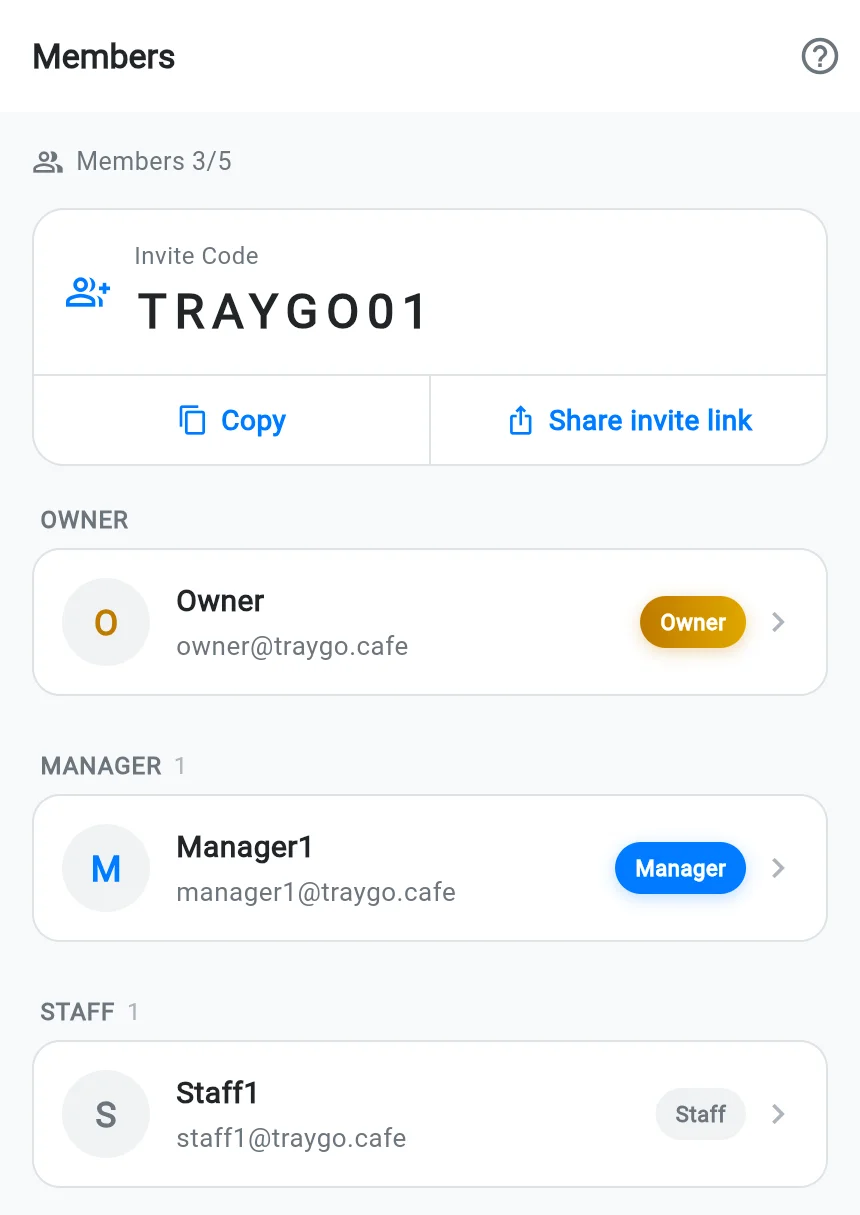
- Tap Share invite link to send the code and the download link together by WhatsApp, text message or any other app.
- Tap Copy to copy just the code.
2. What your staff need to do
- Install the TrayGo app and sign upThe link you sent shows how to install the app, along with the code.
- Choose 'Join Team'On the team setup screen that appears after signing up, tap 'Join Team', not 'Create Team'.
- Enter the invite codeUpper or lower case doesn't matter. Tap Confirm and they're on your team right away.
Tapping the link doesn't fill in the code in the app automatically. Let your staff know: "After you sign up, go to Join Team and enter the code."
3. Set roles
New people start as Staff. On the Members screen, tap a person and use Change role to change it.
| What they can do | Owner | Manager | Staff | Viewer |
|---|---|---|---|---|
| Change stock quantities | O | O | O | X |
| View and export history | O | O | O | O |
| Add, edit and delete items | O | O | X | X |
| Manage categories and purchase orders | O | O | X | X |
| Manage members | O | O | X | X |
| Change team settings, delete the team | O | X | X | X |
- Make someone a Manager if they’ll handle orders and items, Staff if they just record quantities, and Viewer if they only need to look.
- There’s only one owner, and the owner role can’t be handed over to someone else.
Good to know
- Team size, including the owner: up to 2 on Free, 3 on Pro and 5 on Business (Business can add more). The top of the Members screen shows how many you have now.
- People who already belong to another team can’t join straight away. They need to leave that team first.
- If your code has spread further than it should, go to the invite code in Settings and tap Regenerate. The old code stops working immediately.